Business FibreInstallation
Below is information on how you can prepare for your business FTTH installation.
.jpg)
What to expect
Your fibre installation will be completed by our partner, Circet. Their technicians will need access to your premises on the day. When placing an order please provide contact details for a person who will be available on site on the day who has knowledge of the building layout. Your IT person may also need to be on site if you have other services which rely on broadband connectivity.
Connection point
Our equipment needs to be on an internal wall. If your network is overhead, there is more flexibility in where the cable enters the building. If it is underground, it will enter where the duct comes in.
Installed up to 1 metre into your premises
The connection can be installed up to one metre inside your premises. If you need your modem placed further away, an extension product is available. Please speak to your service provider if you would like your modem installed further away.
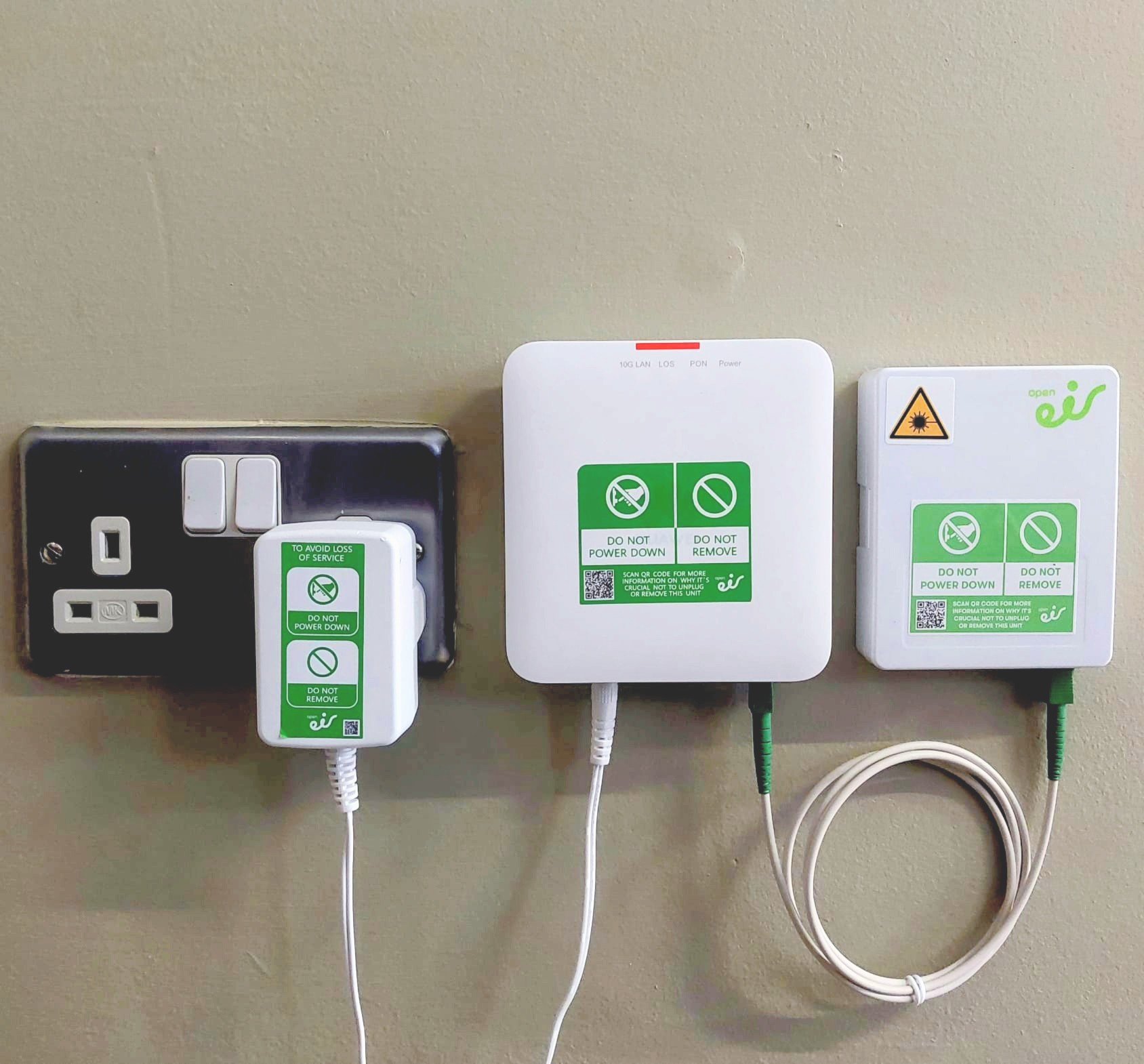
Two units attached to wall - Two sockets required
Two small units will be installed, and your modem will connect to one of the units. One of the units requires power, so please ensure there are two sockets available nearby, one for the network unit and one for your modem.
A small amount of drilling
A small drilled hole at the fibre entry point will be required, about the width of a pen.
How to prepare for your installation
Below are the things you can do to help your appointment go smoothly.

Confirm your appointment
It is essential that you confirm your appointment for it to go ahead. You will receive an SMS from open eir with a link to confirm. If you prefer not to click links, we will call you instead.

External insulation
Let us know if your building has external insulation or cladding. This helps us send the right type of technician. You can confirm this in the SMS portal or during the confirmation call.

Get permission
If applicable, get landlord or building management approval in advance for drilling, cabling or access to comms rooms.
Provide the right contact
Please provide contact details for a person who will be available on site on the installation day who has good knowledge of the building layout. It may also be important to have your IT person on site if you have other services which rely on broadband connectivity.
Important things to be aware of for your installation
Modem & Wi-Fi set up
In many cases modems and Wi-Fi are ordered for self-install, this means that once our technician has completed the install you will set up your own modem and Wi-Fi. If you don't want a self-install please speak to your service provider about your options.
Network Issues
Sometimes we can run into issues, like a blocked duct on private property and access required to a neighbouring property, if this happens we'll clearly communicate with you, and a second visit may be required to complete the install.
Need to Reschedule
You can reschedule or cancel your appointment if needed. You can either call your service provider or you can contact open eir once you receive the text message confirming your appointment.
Installation video
Watch this video below for a full breakdown of what will happen on the day of your installation.
Any questions?Check our FAQ
How do you connect the fibre into my property?
We connect the fibre to your property either overhead or underground. If overhead, we'll run the cable from the nearest pole to where the old copper network entered your home. If underground, we'll access the existing ducting on your premises. If you don't have ducting, we can guide you in setting it up. If the existing ducting is blocked, we mayb be able to help clear it. Additional crews may be needed for this, and we'll discuss this with you beforehand. We have a short installation video which outlines what to expect on installation day (click here).
Can I choose where my modem will be?
There are limitations to where we can install our equipment. Our network boxes can only be installed on an internal wall up to 1 meter from the fibre entry point. You also need to have two plug sockets at this point, one for our equipment and one for your modem.
If you want your modem in a different location, you can run your own ethernet cables from our network boxes, or you can speak to your service provider about our extension product.
Will you install my modem?
Many service providers are now providing modems for self-install. This means they will send your modem to you directly and once our technican has installed fibre in your home you can connect your modem up. Your service provider will give guidance on how to do this.
If your service provider has requested for your modem to be installed by our technican, we will of course set it up and ensure it is working before we leave.
How long will it take to get connected?
Most installations are completed on the first day, but occasionally challenges liked blocked ducts may arise that may require addional visits. However, we have trained crews and processes in place should an issue arise and we will ensure we keep you updated on next steps and progress.
How do I know if fibre is available in my area?
We are rolling out fibre to 1.9 million homes and businesses, today over 1.5 million homes and businesses can access our fibre network, to find out if your home is enabled yet, we have a simple eircode checker (here).
Can I buy fibre from open eir?
We build the fibre network, we complete the physical installation and we maintain the network, but you need to buy the connection or subscription from a retail service provider who bundles our network with their TV, Internet and Voice services. We partner with over 30 providers – so you have a lot to choose from.